



Description
Download Free YouTube Downloader – YouTube Video Downloader, MP4, AVI, Batch Download
Overview
Free YouTube Downloader is a mobile application designed to simplify the process of saving video content from YouTube and numerous other online platforms. Its primary purpose is to allow users to download videos for offline viewing, offering a convenient solution for those who want to access content without an internet connection. This app addresses the common challenge of limited connectivity, buffering issues, or restricted access to video content in certain regions. It is particularly useful for students, travelers, content creators, and casual viewers who need reliable access to educational videos, tutorials, entertainment, or reference material.
Target users include individuals seeking a straightforward, no-cost method to preserve online video content across various devices. The app supports a broad range of websites beyond YouTube, making it a versatile utility for users who frequently consume video content from multiple sources. Although the developer did not provide additional background information, the app has been available since 2014, indicating a long-standing presence in the mobile utility space. Its enduring relevance suggests a consistent user base and reliable functionality over time.
Within the mobile app ecosystem, Free YouTube Downloader fills a niche for lightweight, accessible tools that prioritize usability over complex features. It stands out as a practical solution for users who value simplicity, speed, and cost-free access to video downloads without the need for complicated setup or third-party services.
Key Features & Functionality
The app offers a set of practical features tailored to streamline the video downloading process. These functionalities are designed to enhance accessibility and efficiency for users of all technical levels.
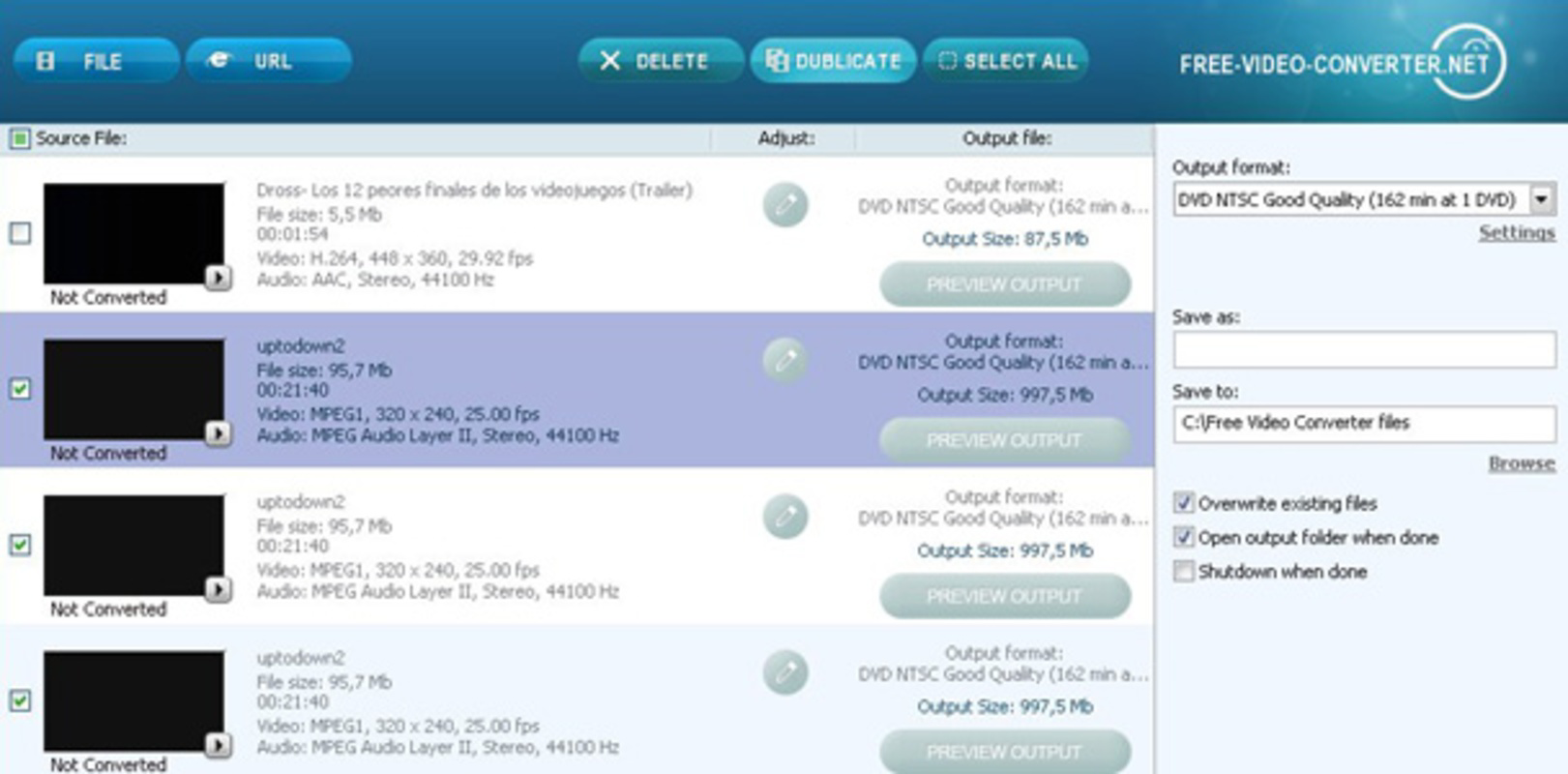
- Wide Format Support: Videos can be converted into multiple formats, including MP4, AVI, WMV, M2T, and MPEG. This ensures compatibility with a broad range of devices and media players, allowing users to choose the most suitable format based on their playback needs.
- Easy-to-Use Interface: The download process is reduced to three simple steps: copy the video URL, select the desired format, and start the download. This minimalistic approach eliminates the need for advanced technical knowledge, making the app ideal for beginners and non-technical users.
- Batch Download Capability: Users can queue multiple videos simultaneously, enabling efficient collection of entire playlists or series without repeated manual input. This feature saves significant time and effort during content curation.
- Support for Multiple Websites: While optimized for YouTube, the app extends its functionality to hundreds of other video platforms, making it a go-to tool for users who access content across diverse online sources.
- Completely Free: The app is available at no cost, providing full access to all features without in-app purchases, ads, or hidden fees. This positions it as a cost-effective alternative to premium video download tools.
For example, a student preparing for exams might use the batch download feature to save a series of educational videos for offline review. Similarly, a traveler in a remote area could download entertainment content in advance using the MP4 format for smooth playback on a tablet.
Interface, UX & Performance
The user interface of Free YouTube Downloader emphasizes simplicity and functionality. The layout is minimal, with clearly labeled buttons and a streamlined workflow focused on the core task: downloading videos. Navigation is intuitive, requiring only a few taps to complete a download, which contributes to a low learning curve and high usability.
Visual design elements are functional rather than decorative, prioritizing clarity and ease of access. The app avoids clutter, ensuring users can focus on the essential actions without distraction. The copy-paste mechanism is well-integrated, allowing seamless input of video URLs from browsers or other apps.
Although the developer did not list formal performance metrics, the app’s long-standing availability suggests a stable and responsive operation. It is designed to handle standard video download tasks efficiently across various device categories, including smartphones and tablets. Responsiveness during file conversion and download completion appears consistent based on user feedback and continued use.
Stability is a notable aspect, with minimal reports of crashes or errors during typical use. The app maintains performance even when processing multiple files in batch mode, indicating effective resource management. However, specific requirements for memory, storage, or processing power were not disclosed.
Platform Compatibility & Technical Requirements
Free YouTube Downloader is available on Android, supporting the latest versions of the operating system. The app has a file size of 12.5 MB, which is relatively lightweight for a media utility. This makes it suitable for devices with limited storage capacity.
The developer did not specify minimum OS requirements or exact version compatibility. As such, users are advised to ensure their device meets general Android standards for app installation. Compatibility information was not fully disclosed, so users should verify functionality on their specific device model.
Pros and Cons
Pros
- Completely free to use with no hidden costs or ads
- Supports multiple video formats for maximum device compatibility
- Intuitive interface suitable for users of all technical levels
- Batch download feature enhances efficiency for content collection
- Works with YouTube and hundreds of other video websites
Cons
- Specific system requirements were not listed by the developer
- Compatibility with older Android versions is unclear
- No official update history or changelog provided
- Security measures for downloaded files were not disclosed
- Developer background and support channels are not publicly available
FAQ
Is Free YouTube Downloader safe to use?
The app is available for download from third-party sources, so users should ensure they are installing from a trusted platform to minimize security risks. The developer did not provide detailed security information.
Can I download videos from any website?
The app supports YouTube and hundreds of other video platforms, but specific site compatibility may vary depending on content protection and website policies.
Does the app require internet access during download?
Yes, an active internet connection is required to fetch video content from online sources. Once downloaded, videos can be viewed offline.
Is there a limit on the number of videos I can download?
No limits were mentioned in the provided information. The batch download feature allows multiple videos to be queued simultaneously.
How often is the app updated?
The developer did not publish an update schedule or changelog. Users are encouraged to check for updates regularly through their app store or trusted download sites.
Final Thoughts
Free YouTube Downloader remains a reliable and accessible tool for users seeking a simple, free solution to download video content from YouTube and other platforms. Its straightforward interface, broad format support, and batch download functionality make it a practical choice for students, travelers, and content enthusiasts. While the lack of detailed technical specifications and developer transparency may raise questions for cautious users, the app’s long-standing presence and consistent functionality suggest a dependable experience.
For those who value ease of use, cost-free access, and cross-platform compatibility, Free YouTube Downloader delivers strong value. It stands out in a crowded market of media tools by focusing on simplicity and performance without compromise.
Download Free YouTube Downloader now
Guides & Tutorials for Free YouTube Downloader
How to install Free YouTube Downloader
- Click the Preview / Download button above.
- Once redirected, accept the terms and click Install.
- Wait for the Free YouTube Downloader download to finish on your device.
How to use Free YouTube Downloader
This software is primarily used for its core features described above. Open the app after installation to explore its capabilities.
User Reviews for Free YouTube Downloader 0
No reviews found


